CREATIVE EXPERIMENT
A handful of sticks can become a little world.
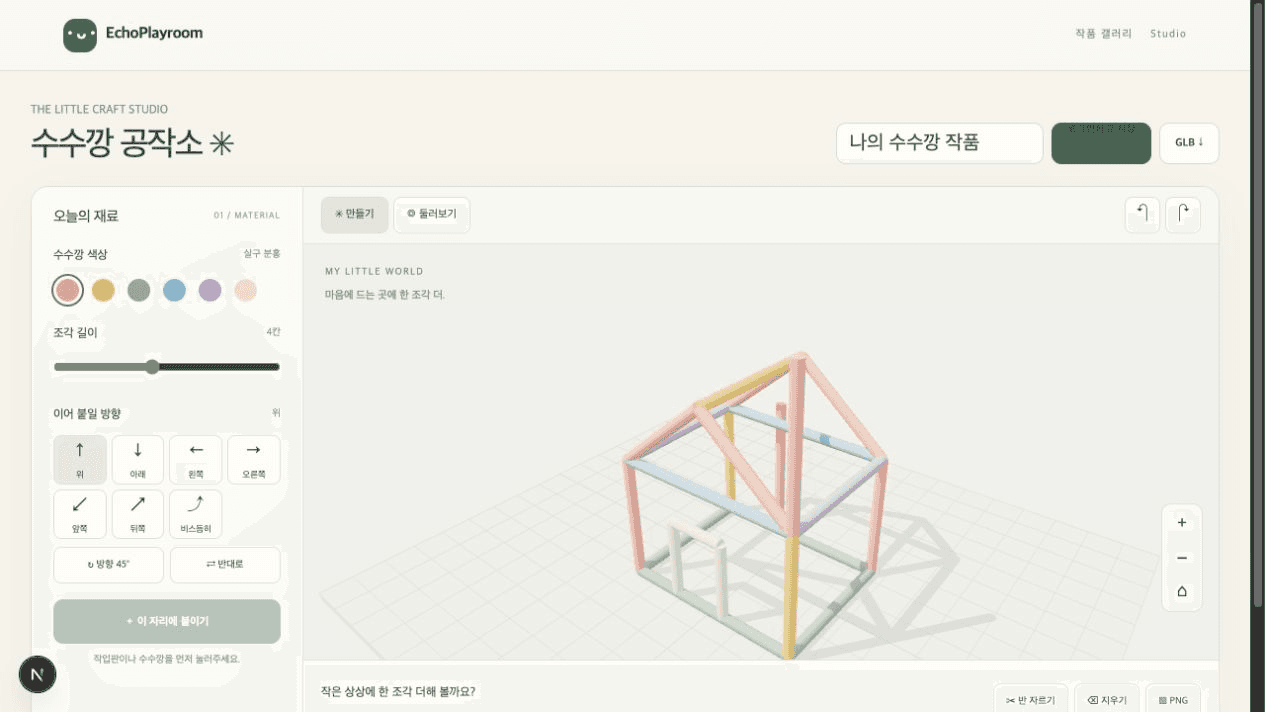
Select the board and place your first piece. Continue from a stick endpoint or midpoint to grow houses, bridges, letters, and imagined structures in 3D.
Connect points or create an axis
Join any start and end point directly. When you need a new spatial direction, combine lengths from one to eight units with vertical, horizontal, depth, or diagonal axes.
Revise while you build
Select a piece to cut it in half or remove it, and use undo and redo to explore freely.
Keep work in the browser and database
The current project auto-saves in your browser. Publish with a one-time nickname and deletion password while the gallery keeps the presentation focused on each creation.
Three download formats
Download the current 3D view as PNG, the finished sticks as GLB, or an editable project as JSON, all named after the creation.
ABOUT THIS EXPERIMENT
Inside the studio
A stick-only lab
The bird visitors and feeding observation from the standalone prototype were intentionally left behind. This lab focuses on choosing, connecting, refining, and saving craft sticks.
Touch and mouse controls
Tap the board or an existing stick to choose points. On PC, right-drag to orbit and use the wheel to zoom.
From visible creation to usable file
The GLB excludes the board and lights, and contains only the completed stick meshes for use in another 3D tool or game project.
A gallery of shared imagination
Published creations appear newest first. Open the card menu to continue editing or download PNG and GLB files.
Storage notes
- Auto-save
- One current project is stored in this browser. Clearing browser data can remove it, so you can also keep a JSON project file.
- Gallery
- Publish without an account using a nickname and deletion password. The password is stored as a secure hash, while this browser can reuse it for future publishing and deletion.
- GLB
- Each stick becomes a mesh node. More complex creations contain more nodes, up to the 400-piece project limit.
COMMUNITY
Player reactions
Support Stick Studio
Likes and play feedback are stored per game and browser.
PLAY THE CURRENT BUILD
 Released
 Released
 Released
Loading player reactions.